Naming your file
(& other information about word processors
and email)
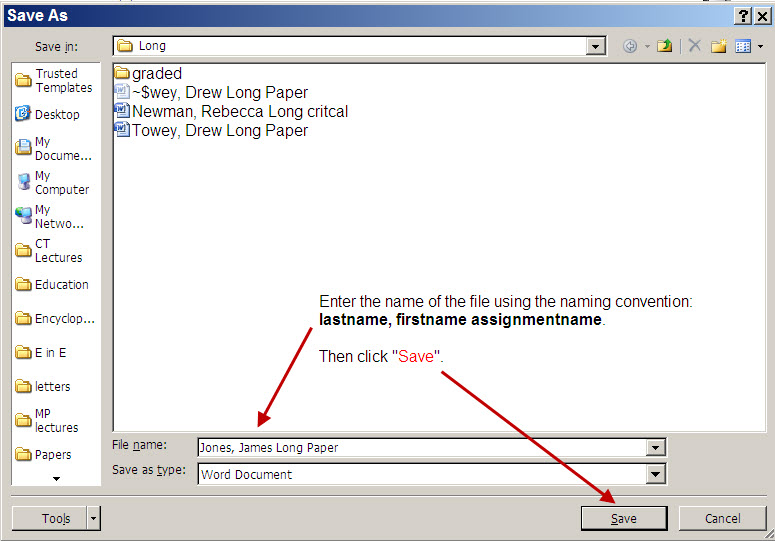
When you are ready to save your essay, name it using the following convention:
lastname, firstname (section number) assignment, e.g.,
Jones, James Draft
If you are unsure how to do that:
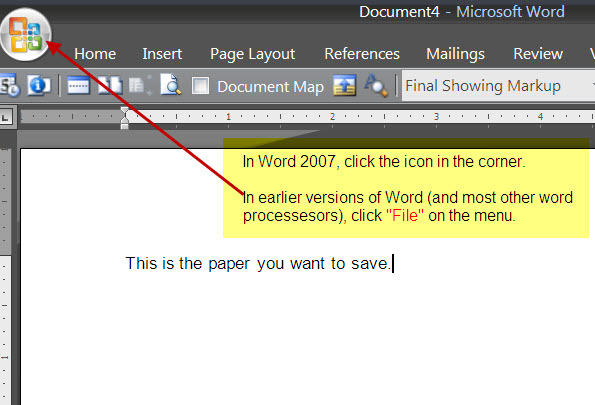
1) After you have finished the paper, choose either the Office icon or "File" from the main menu (as shown below)
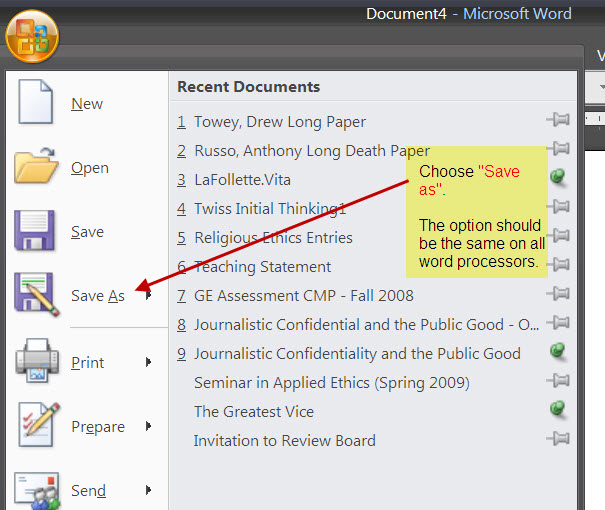
2) Then choose "Save As" (as shown below):
3) Then enter the file name (as specified above); click "Save" (as shown below):
4) When you are ready to submnit it, submit it via Canvas. Instructions are available on the Canvas course page.
________________________________________________________________________________________
Other information about word processors and email
Three things you may not know:
(1) You need not ― indeed should not
―
manually enter page numbers. If it is not already set up to add them
automatically, then,
in Word, click "View," then "Header and Footer,"
then hit the button on "insert auto text." Choose what you want
(plain
page number, author and page number, etc,) then hit close. It will be added
automatically.
(2) You need not ― indeed should not
― manually enter a Hard Return [the ENTER key ] at the
end of each line. The word processor will
do that automatically. You only need to hit ENTER at the end of a
paragraph.
(3) When you send email, and you want to make sure the person
has received it, you can ask for a delivery and a read receipt.
To do this for
all your emails, Choose "Tools" from the main menu. Select "Options,"
then, on the "Preferences" tab, select "E-mail options, and finally,
"Tracking options." Put a check by both "Request a Delivery Receipt" and
"Request a Read Receipt." If you just wish to do this for
the email coming to me, then, before sending it, selection "Options" and then
choose "Request a Delivery Receipt" and "Request a Read Receipt."
Save these to have a record showing when you sent and when I received the files.
back to: